 LCM Nav3D
Free demo
Get it on Fab
LCM Nav3D
Free demo
Get it on Fab
LCM Nav3D - Mass Entity Trait Reference
How to build a Mass crowd/agent with LCM Nav3D. Add these traits to a
Mass Entity Config asset
(Create → Miscellaneous → Mass Entity Config) and use it on
an AMassSpawner.
One rule: every agent needs exactly one movement trait. Everything else is an orthogonal add-on. The editor validator (below) enforces this.
The anatomy of a config
A Mass Entity Config is a list of traits. A working Nav3D agent needs one from each of three categories, and no more than one from the movement category.
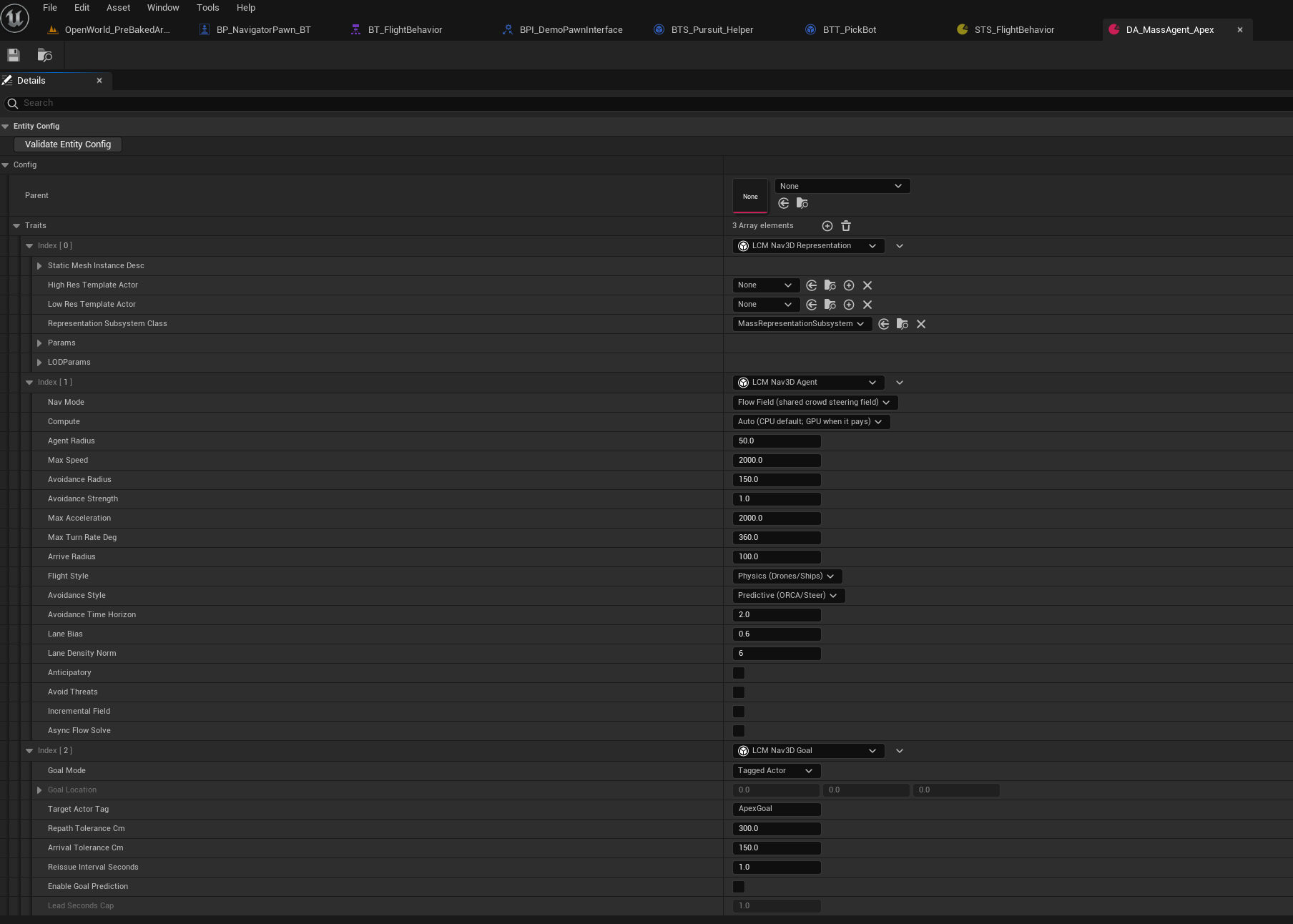
Figure 1 - A three-trait config, one per category.
| Index | Trait | Category | Why it is here |
|---|---|---|---|
[0] |
LCM Nav3D Representation | Rendering - pick one | Without a rendering trait your agents move correctly and are invisible |
[1] |
LCM Nav3D Agent | Movement - exactly one | Its Nav Mode picks Path Following or Flow Field |
[2] |
LCM Nav3D Goal | Goal | Here Goal Mode = Tagged Actor, targeting tag
ApexGoal |
Things the screenshot shows that are easy to miss:
Validate Entity Configat the top runs the trait-combination check on demand. It also runs on save and on cook.Compute- leave it onAuto. This release solves on the CPU, soAutoandCPUbehave identically; the selector is kept for forward compatibility.- Greyed rows are not disabled features.
Goal Locationis greyed becauseGoal ModeisTagged Actor, andLead Seconds CapbecauseEnable Goal Predictionis off. The panel hides what the current configuration will ignore.
⛔ This config is also the worked example of the one rule
Look at
[1]and[2]together. The Agent'sNav ModeisFlow Field, butLCM Nav3D Goalis a Path Following add-on - it drives the path-request fragment, and a Flow Field agent never issues one.So this combination fails validation, with:
LCM Nav3D Goal only works with a Path Following agent (it drives the path-request fragment). For a Flow Field agent, set the goal on the 'LCM Nav3D Agent' trait's Goal / Goal Mode properties instead.
The fix is one of two things, and which one depends on what you want:
You want Change A 10K-scale crowd sharing a goal Remove the Goal trait. Set the goal on the Agent trait's own Goal Modeproperties.Per-agent precise routes Set Nav ModetoPath Following. The Goal trait is then correct as it stands.Press Validate Entity Config on any config you build. It catches this, the duplicate-movement-trait case, and the mixed Path+Flow case - all three of which are silent at runtime and present as "my agents do not move".
The traits
🟢
LCM Nav3D Agent - the one movement trait (start here)
The single authoring entry point. Pick a Navigation Mode:
| Navigation Mode | What it does | Fragments composed |
|---|---|---|
| Path Following | Per-agent A* through the SVO (HPA* across chunks). Best for hero/mid-count agents, precise routes, infinite worlds. | NavAgent, PathRequest,
PathResult |
| Flow Field | One shared Dijkstra flow field per goal, O(1)/agent sampling. Best for 10K-scale crowds sharing goals (finite worlds). | FlowField (state) + FlowConfigShared
(const shared config) |
Mode-specific properties hide automatically via
EditCondition. Common movement knobs (radius, speed, accel,
turn-rate, avoidance style, flight style, lane bias) apply to both.
Dense crowds and fish schools (Flow Field)
Three settings on the Agent trait for crowds whose bodies must not overlap:
- Hold Avoidance Between Scans (default off). The
neighbour scan runs every other frame
(
r.LcmNav.Mass.FlowAvoidStride). Off, the frames in between steer with no avoidance, so agents feel half their separation. On, those frames reuse the last result. Crowds tuned with it off get about twice the avoidance they were tuned for, so re-check their arrivals. - Contact Push (default 0, Reactive style). Pushes apart two agents whose bodies overlap: a velocity of (overlap depth / radii sum) x Max Speed x this. Arrived agents that overlap keep separating, so a crowd no longer piles onto its goal. 0.5 is a firm, smooth push.
- Schooling. Steer as a fish school instead of by the Avoidance Style: keep personal space, anticipate collisions, match neighbours' heading and close up to them, and turn away from rocks and glass before reaching them. The flow field still says where to go. All distances are in body lengths (BL), so one config works at any scale. The same settings sit on a pawn's Flight Movement component (see the Flight Locomotion Reference).
| Setting | Default | What it does |
|---|---|---|
| Enabled | off | Use the school model instead of the generic avoidance. |
| Body Length Cm | 0 (= 4 x collision radius) | The unit every other distance is measured in. |
| Body Width BL | 0.25 | Body width as a fraction of length. Contact and personal space are measured between fish-shaped bodies. |
| Perception BL / Max Neighbours | 4 / 7 | How far a fish notices others, and how many of the nearest it responds to. |
| Repulsion BL / Align BL | 1.0 / 2.5 | Personal space (inside it the fish only moves away), and the range where it matches heading; beyond it, it closes up. |
| Blind Angle Deg | 60 | Rear cone where neighbours are not seen for alignment and attraction. |
| Goal / Repulsion / Align / Attract Weight | 1.0 / 2.0 / 0.6 / 0.3 | How much each term steers. |
| Anticipation Weight / Seconds | 1.5 / 1.5 s | Steer off a collision course before it happens. |
| Wall Weight / Wall Range BL | 3.0 / 2.0 | Turn away from rocks and glass before reaching them. |
| Steer Smoothing Seconds | 0.2 s | How quickly the heading follows the terms. |
| Max Command Angle Deg | 60 | The command stays this close to the nose, so the body turns instead of skidding. |
| Min Speed Fraction | 0.35 | Slowest a schooling fish swims (fish do not hover). |
| Leadership: Informed Fraction | 1.0 | Fraction of the school that steers for the goal; the rest follow their neighbours (Couzin et al. 2005). |
| Leadership: Uninformed Goal Scale / Goal Standoff BL / Goal Contention BL | 0.1 / 0 / 2.0 | How much followers still steer for the goal; where the goal's pull fades; when a goal another fish holds counts as reached. |
| Predator: Threat Range BL / Escape Weight | 5 / 4 | A body half again this fish's size or more that is not schooling with it is fled from, by the fountain manoeuvre. |
| Predator: Alarm Spread / Alarm Decay Seconds / Alarm Cohesion | 0.8 / 1.5 s / 1.0 | How alarm passes between schoolmates, how fast it fades, and how much an alarmed school tightens. |
| Swimming: Burst And Coast | off | Kick, then glide, turning mostly at the kick. Kick Period, Burst Fraction and Burst Speed Swing shape it. |
The Fish Tank demo maps (Behavior Tree, StateTree, Mass) use it.
➕
LCM Nav3D Goal - auto-pathing (Path Following only)
Points a Path Following agent at a fixed location or a tagged actor and keeps it pathed there (re-pathing on drift, optional lead-prediction for moving targets). Not for Flow Field - set the goal on the Agent trait's Goal Mode properties instead. The validator warns if you get this wrong.
➕
LCM Nav3D Perception - SVO-LOS sight (either mode)
Makes an agent both a senser and perceivable
(faction-based, true-3D SVO line-of-sight). Writes a per-agent "closest
visible threat" surface read by EQS, StateTree, or steering. Opt-in
avoidance: r.LcmNav.Mass.PerceptionAvoid 1 makes Flow Field
agents veer from their own perceived threat.
🎨 Rendering - pick ONE
| Trait | Use when | LOD? | Animation |
|---|---|---|---|
| LCM Nav3D ISM Render | Turnkey, hundreds-low thousands, "just draw a mesh". | No | Yes - 2 per-instance custom-data floats: [0] speed01
(walk/run blend), [1] stable phase (de-sync). Feed a
VAT/WPO material. |
| LCM Nav3D Representation | LOD-culled crowds; optional hero actor up close. Wraps Epic MassRepresentation with sane defaults (draws ISM at all visible LODs, culls far). Needs a viewer/player in the level for LOD distance. | Yes | Via the mesh material / actor |
| (Niagara GPU crowd) | 10K+ (deferred / roadmap) | - | VAT |
Combination matrix
| Agent (Path) | Agent (Flow) | Goal | Perception | ISM Render | Representation | |
|---|---|---|---|---|---|---|
| Agent (Path) | - | ❌ conflict | ✅ | ✅ | ✅ | ✅ |
| Agent (Flow) | ❌ conflict | - | ⚠️ use Agent goal | ✅ | ✅ | ✅ |
| Goal | ✅ | ⚠️ redundant | - | ✅ | ✅ | ✅ |
| Perception | ✅ | ✅ | ✅ | - | ✅ | ✅ |
| ISM Render | ✅ | ✅ | ✅ | ✅ | - | ❌ pick one |
| Representation | ✅ | ✅ | ✅ | ✅ | ❌ pick one | - |
- ❌ conflict - two movement stacks; the editor validator errors and (at runtime) the two steerers mutually exclude → the entity would not move. Keep one.
- ⚠️ - allowed but pointless; the validator explains.
The editor validator
ULcmMassConfigValidator runs on every
UMassEntityConfigAsset (right-click → Validate, or on
save/cook). It errors on:
- Two movement stacks (Path + Flow, in any mix of unified/legacy traits).
- Goal without a Path Following agent.
So a broken config can't ship. Requires the Data Validation plugin (bundled).
Migration from the old traits
The pre-2026-07 traits still work (byte-identical archetypes) but are marked (Legacy) and superseded by the unified trait:
| Legacy trait | Replace with |
|---|---|
LCM Nav3D Agent (Legacy) |
LCM Nav3D Agent, NavMode = Path
Following |
LCM Nav3D Flow Steer (Legacy) |
LCM Nav3D Agent, NavMode = Flow
Field |
Existing content (e.g. DA_MassAgent_Apex) keeps working
- no forced migration.
Default-value deltas when migrating (the unified
trait has ONE default per property; the two legacy traits differed):
ArriveRadius is now 100 (legacy path 80 /
legacy flow 150) and AvoidanceStyle defaults to
Reactive (the legacy Flow Steer defaulted to
Predictive/ORCA). If your config relied on a legacy default, set the
value explicitly after switching traits. TargetActorTag
defaults to ApexGoal (matches legacy).
World Partition / large-world (City Sample scale) - REQUIRED READING
The vanishing-crowd trap (stock engine behavior)
AMassSpawner::BeginDestroy calls
DoDespawning - the spawner destroys every entity it
spawned when the spawner actor is destroyed (engine
MassSpawner.cpp). In a World Partition map a placed spawner
is spatially loaded by default, so when the player
leaves the spawner's cell, the spawner streams out and silently
deletes the entire crowd. Symptom: agents work near the spawn
area, then all disappear when the player walks away.
Fix (pick one):
- Use
LCM Nav3D Crowd Spawnerinstead of the stock Mass Spawner - identical (EQS generators etc. all inherited) but defaults to not spatially loaded, so its crowd's lifetime is never tied to the player's position. - On a stock
AMassSpawner: Details → World Partition → Is Spatially Loaded = false.
This follows the AAA rule: population lifetime must be owned by something persistent (an always-loaded actor/subsystem), never by a streamed actor. Distance-based despawning should be an explicit population policy (an ambient ring, à la City Sample's crowd), not a streaming side effect.
City-scale checklist
- Navigation: a city does not fit the finite default
(
WorldExtent= 100 m). Use the manager's Infinite World mode (Hierarchical HPA*); the flow crowd keeps its own nav chunks resident via crowd-driven streaming (r.LcmNav.Mass.CrowdStreaming, default on) - agents don't lose nav when the player (the only invoker) leaves. - Rendering:
LCM Nav3D Representationculls agents visually past its LOD distances (defaults: Off at 200-250 m - deliberately conservative). For city vistas, raiseLODParams.BaseLODDistance/VisibleLODDistanceon the trait. This is visual LOD only - entities keep simulating; it is NOT the vanishing-crowd trap above. - Ambient population ring (constant-density crowds around the player with bounded cost, the City Sample pattern) is a roadmap feature - until then, crowds are persistent: they exist wherever you spawned them.
Useful CVars
| CVar | Default | Effect |
|---|---|---|
r.LcmNav.Mass.PerceptionAvoid |
0 | 1 = Flow agents veer from their perceived closest threat. |
r.LcmNav.Mass.PerceptionAvoidRadiusCm /
...Strength |
600 / 1.0 | Perception-avoidance range + strength. |
r.LcmNav.Mass.ISMAnimRefSpeedCmS |
600 | Speed (cm/s) mapping to ISM custom-data
speed01 = 1. |
r.LcmNav.Mass.Anticipatory |
−1 (per-trait) | Route Flow crowds around where obstacles are heading. |
r.LcmNav.Mass.FlowAvoidHold |
−1 (per-trait) | Force Hold Avoidance Between Scans on (1) or off (0). |
r.LcmNav.Mass.FlowContactPush |
−1 (per-trait) | Force one Contact Push gain for every Reactive-style crowd. |
r.LcmNav.Mass.FlowMissRecovery |
1 | A finite-world Flow agent pushed off the field's covered space (against a rock or a wall) steers back to the nearest covered point instead of stopping. 0 = old behaviour (it holds). |
r.LcmNav.FishSchool.Enable |
1 | 0 = every crowd and pawn with Schooling on falls back to its generic avoidance. |